

Switch expressions and enhanced pattern matching are great new concepts working together with C# 8. I’ve already written some blog articles on new C# 8 features – but this one goes a different twist in showing the switch statement from previous C# versions and converting it to the switch expression with C# 8 – from a concrete sample from some of my books. In the sample code I’m showing how the code from a WPF DataTemplateSelector can improve. I’m sure you’ll find many code segments that can improve from C# 8.
approach in converting existing C# 7 code with the switch statement to use the new C# 8 syntax.

C# 6 switch Statement
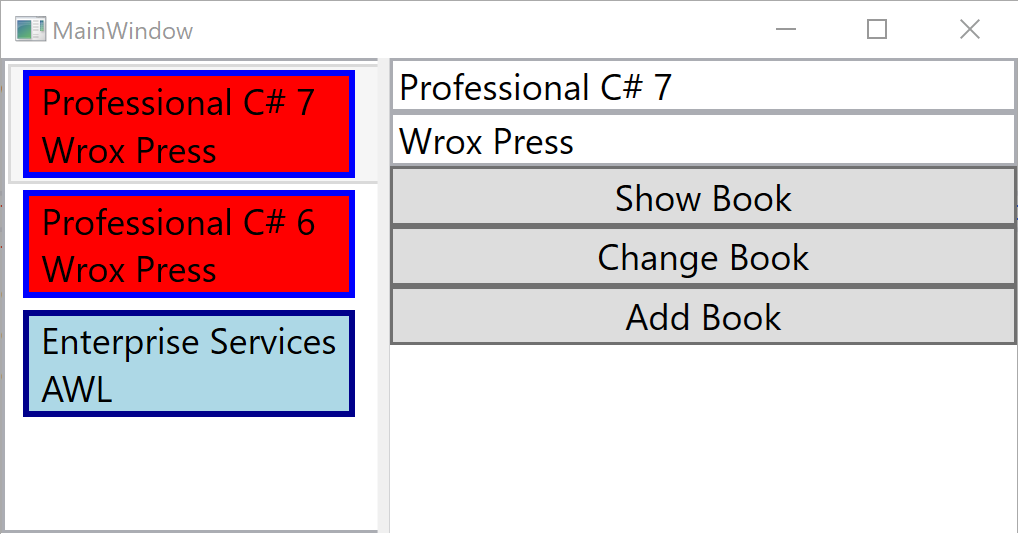
A WPF, UWP, and Xamarin DataTemplateSelector can be used to return different data templates based on the data of an item. Depending on the content, items in list can make use of different templates. The BookTemplateSelector from the sample code decides based on the Publisher property of the Book type to return a different data template, either a WroxBookTemplate or a AWLBookTemplate in case on Wrox Press and AWL books, and a DefaultBookTemplate on any other publishers. In case the item is not a Book, null is returned. Here, the code is implemented with a traditional switch statement:
public class BookTemplateSelector : DataTemplateSelector
{
  public DataTemplate DefaultBookTemplate { get; set; }
  public DataTemplate WroxBookTemplate { get; set; }
  public DataTemplate AWLBookTemplate { get; set; }

  public override DataTemplate SelectTemplate(object item, DependencyObject container)
  {
    var book = item as Book;
    if (book == null) return null;

    DataTemplate selectedTemplate = null;
    switch (book.Publisher)
    {
      case "Wrox Press":
        selectedTemplate = WroxBookTemplate;
        break;
      case "AWL":
        selectedTemplate = AWLBookTemplate;
        break;
      default:
        selectedTemplate = DefaultBookTemplate;
        break;
    }
    return selectedTemplate;
  }
}
Running the application, different templates show up depending on the publisher:
C# 7 with Pattern Matching
With C# 7, pattern matching was introduced. This allowed using the is operator and directly assign the result to a type. The as operator from the previous code sample is changed to use the is operator instead. Other than that, there’s not a lot change:
  public override DataTemplate SelectTemplate(object item, DependencyObject container)
  {
    if (item is Book book)
    {
      DataTemplate selectedTemplate = null;
      switch (book.Publisher)
      {
        case "Wrox Press":
          selectedTemplate = WroxBookTemplate;
          break;
        case "AWL":
          selectedTemplate = AWLBookTemplate;
          break;
        default:
          selectedTemplate = DefaultBookTemplate;
          break;
        }
        return selectedTemplate;
      }
      else
      {
        return null;
      }
    }
C# 7 with case statement and when clause
C# 7 had another feature with pattern matching. Not only the is operator but also the switch statement allows for pattern matching. In the sample code, a match for a type is done. With the when clause, multiple case statements allow for the same type in case the when clause differs. The when keyword is used here in a similar way as with exception handling.
  public override DataTemplate SelectTemplate(object item, DependencyObject container)
  {
    DataTemplate selectedTemplate = null;
    switch (item)
    {
      case Book b when b.Publisher == "Wrox Press":
        selectedTemplate = WroxBookTemplate;
        break;
      case Book b when b.Publisher == "AWL":
        selectedTemplate = AWLBookTemplate;
        break;
      case Book _:
        selectedTemplate = DefaultBookTemplate;
        break;
      default:
        selectedTemplate = null;
        break;
    }
    return selectedTemplate;
  }
C# 8 with select expression and pattern matching extended
Next, let’s get into the C# 8 version. This version is a lot shorter. Some not used to using the Lambda expressions might argue that this code is not readable. I think the contrary. You just need to get used to Lambda expressions that are already used everywhere. The code is a lot shorter, and the essentials are lot easier to grasp. The switch statement is reversed with the switch expression. The variable to switch on is first – followed by the switch keyword. You don’t need to write case and break anymore. Every match on the left side with a pattern is followed with a lambda operator to separate the right side with the result. The sample code makes a match for the Book type – and uses the property pattern to match for specific property values:
public class BookTemplateSelector : DataTemplateSelector
{
  public DataTemplate? DefaultBookTemplate { get; set; }
  public DataTemplate? WroxBookTemplate { get; set; }
  public DataTemplate? AWLBookTemplate { get; set; }

  public override DataTemplate? SelectTemplate(object item, DependencyObject container)
    => item switch
    {
      Book { Publisher: "Wrox Press" } => WroxBookTemplate,
      Book { Publisher: "AWL" } => AWLBookTemplate,
      Book _ => DefaultBookTemplate,
      _ => null
    };
}
Comparing the switch expression to the switch statement, some restrictions exist. With the switch statement, every case can invoke an action. With the switch expression, a value needs to be returned. For invoking different actions, keep the switch statement – or do a bigger refactoring.
The switch statement also allows multi-line statements with every case. Often this makes the code more unreadable. This cannot be done with the switch expression – only a single expression can be used on the right side. However, you can create a local function nearby the switch expression, and invoke this on the right side of the Lambda.
With the code sample I’ve also used the C# 8 feature nullable reference types.
Take away
I like the new switch expression – it reduces the code to write and also gives better readability. Compared to the switch statement the essentials of the code are easier to grasp – as soon as you are used to Lambda expressions. As Lambda expressions are used in C# everywhere, I think all C# developers should also get used to the switch expression with C# 8.
If you’ve read this far, consider buying me a coffee which helps me staying up longer and writing more articles.

You can get the complete sample with WPF and .NET Core 3.0 from.
More articles on C#
Explicit Interface Implementation with C# 8
C# 8 & No More NullReferenceExceptions – What about legacy code?
C# 8 Pattern Matching Extended
More information on C# and programming .NET Core applications is in my book Professional C# 7 and .NET Core 2.0, and in my workshops.
Enjoy learning and programming!
Christian
Music Image ID 26633427 © catiamadio





Leave a Reply